
4 posts tagged with "CaseManagement"

View All Tags

· 4 min read

The update calls that quietly shape the day

When people think about inbound calls at law firms, the focus usually lands on new leads. But many firms also handle a steady stream of calls from existing clients who just want to know where things stand. From what we have seen across firms, on average more than half of monthly inbound calls fall into this category. Not all of them are routine, but it gives a clear sense of the scale.
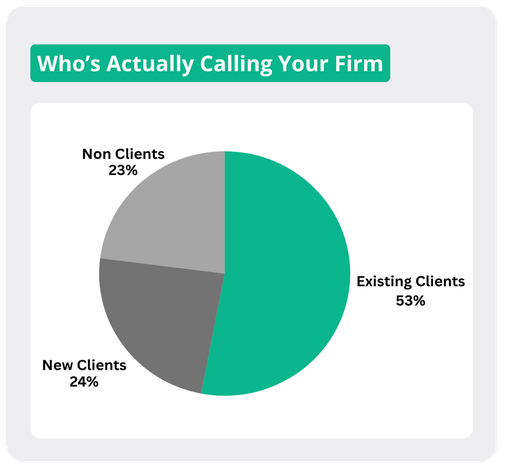
Who is actually calling your firm: pie chart of existing clients, new clients, and non-clients

These are not complicated conversations. They are quick check-ins, often driven by a need for reassurance or clarity, yet they tend to land right in the middle of everything else your team is trying to do.

In a typical flow, a receptionist answers, gathers details, and then tries to connect the caller with someone who has matter context. If that person is in a meeting, in court, or already on another call, the client waits or the team adds another callback to the list. Nothing about this is fundamentally broken, but it quietly pulls your team away from the work that actually moves cases forward.

Over time, that tradeoff becomes harder to ignore. Time spent tracking down updates is time not spent preparing filings, thinking through strategy, or helping a client through something that actually requires legal expertise. The cost is that it can slow down the very progress the client is calling to ask about in the first place.

As we worked through these workflows with firms, the question was not just whether AI could answer status questions. It was whether it could give your team that time back in a meaningful way.

That is what led to Case Updates. The goal is straightforward: let the AI handle routine status calls from start to finish so your team does not have to step away from meaningful work to relay information that already exists in your systems. Instead of pausing a call while someone searches for records, the AI verifies the caller, pulls the right context from the CRM or CMS, and answers the question immediately.

This is not about reducing touch points with a client. Instead, it is about recognizing that your team creates the most value when they are helping clients make progress and not when they are repeating information that is already available.

How it works in practice

When an existing client calls, the AI confirms identity using the firm's process and available records. Once it matches the caller to the correct matter, it retrieves the latest case context in real time.

If the request is a routine update, the AI handles it on the spot, removing the need for holds, transfers, or interruptions to your team's workflow. Instead of pulling someone out of their current task to check a system and relay information, the update is delivered immediately and accurately within the same conversation.

The result is fewer context switches and fewer small interruptions that break up deep, focused work. And when something does require human input, the call still routes to the right person, but now it comes with context so your team can focus on solving the problem rather than reconstructing it.

What this unlocks for firms

Clients still get answers quickly, but your team is no longer the bottleneck for routine information. They remain engaged in the work that actually requires judgment, experience, and sustained attention.

That shift changes the rhythm of the day. There are fewer interruptions, less time spent on repetitive tasks, and more time available for the kind of work that moves cases forward. It also changes how clients experience your firm. They continue to feel informed, but when they do speak with your team, the conversation centers on progress, decisions, and next steps rather than basic status updates.

Case Updates is not about removing conversations. It is about ensuring your team is fully present for the ones that matter most.

Handle routine case updates without interrupting legal work

See Case Updates and your AI client communication workflow in a live walkthrough.

See it in Action

· 5 min read

One of the most rewarding parts about building AI employees for law firms is discovering the "in-between" work that happens after the big moments. Everyone thinks about intake, signing, and case milestones, but once a personal injury client is onboarded and treatment begins, a second job kicks off in the background: helping treatment stay on track and making sure it's documented well enough to support the case.

Why treatment history moves settlement value

If you've been around personal injury long enough, you already know this, but it's worth saying plainly. Settlement value isn't just about the crash or the initial diagnosis; it's about the story the attorney can build and defend, and the treatment record is a huge part of that story. Consistent care, a clear timeline, and documented progress give attorneys leverage, while gaps and missing updates are exactly the kind of things insurance adjusters use to argue the injury "wasn't that bad" or "must not have been related."

Why firms lose the thread

Most firms don't let treatment tracking slip because they don't care. It slips because everyone is overloaded. Case managers and attorneys are already juggling nonstop work, and treatment follow-up becomes a repeating checklist that never really ends: reminders, reschedules, attendance checks, "how did it go?" updates, and then the extra step of putting everything somewhere organized. Multiply that across dozens or hundreds of active clients and it's easy to see how it turns into an "if we get to it" task.

The tough part is that treatment doesn't wait for a firm's bandwidth to open up, so when follow-up slows down the case doesn't pause with it. A client misses a physical therapy session and doesn't mention it, a chiropractor schedule starts getting spotty, or someone quietly stops going because life gets busy or they convince themselves they're "fine now." Even when clients are still showing up, updates often live in scattered texts or quick conversations and never make it into the CRM in a usable way. Later, when the firm needs a clean, defensible treatment narrative to support settlement value, the timeline can feel incomplete.

Building Treatment Tracking

When we saw this pattern across firm after firm, it felt like the kind of problem that shouldn't be "normal" anymore. Not because it's trivial, but because it's repetitive, time-sensitive, and mostly communication driven, which is exactly where an AI employee can shine. So we built Treatment Tracking for our intake AI employees at Reflekt Legal, and we're excited about it because it's one of those features that makes people pause and say, "Wait... we can automate that?"

The idea is straightforward: if an AI employee is already communicating with clients and can hold a natural conversation, it can also handle the follow-up that firms rarely have time to do consistently. It doesn't forget, it doesn't get pulled into a fire drill, and it doesn't treat follow-up like a nice-to-have. It just runs the process, reliably, for every client.

How it works

Treatment Tracking starts with appointment reminders. When a client has an upcoming treatment appointment, whether it's physical therapy, a doctor visit, or a chiropractor session, the AI reaches out ahead of time to remind them and reduce no-shows. Because it's automated, the firm isn't spending staff time on high-volume reminder work, and clients still get the nudge they often need.

After the appointment window passes, the AI follows up to confirm whether the client attended and how it went. Clients respond the way they naturally would in a text conversation, and those responses capture the details firms wish they had later: whether the session happened, how the client felt, what the provider said, and whether there were any new recommendations or next steps.

Then the system does the part that usually breaks down in real life: it logs everything. Each response is recorded directly in the CRM, building a treatment timeline without anyone needing to copy, paste, summarize, or remember to update notes. Over time, that becomes a structured record the firm can pull up instantly, instead of trying to reconstruct treatment history from scattered messages and memory.

Learn more

What this unlocks for firms

What we love about this is that it doesn't just reduce admin work; it changes what firms can realistically stay on top of day to day. Instead of guessing how treatment is going across a caseload, teams can see a current picture of attendance, continuity, and progress. It also shifts problems earlier, so firms don't find out about missed appointments weeks after the fact or scramble to rebuild a timeline when negotiations are already underway.

At the end of the day, personal injury is documentation-heavy, and case value is tied to the strength of the record the firm can defend. Treatment Tracking is our way of making sure that record gets built continuously, with details captured while they're fresh and organized where the team already works. It's one of those "why wasn't this always automated?" features, and we think it's going to make a meaningful difference for firms that want to maximize outcomes for their clients without adding another ongoing task to an already overloaded team.

Keep treatment documented and tied to the matter

See Treatment Tracking and client follow-up in a live walkthrough.

See it in Action

· 4 min read

The calls nobody was counting

One of the surprises we ran into while working with growing law firms was how much of their phone traffic had nothing to do with new leads. A firm would tell us they were getting slammed, and everyone assumed that meant more intake calls. Then we looked closer and found a huge share of calls coming from insurance adjusters, medical providers, and treatment offices calling in with updates, requests, and quick questions tied to existing cases.

What really stood out was that the firm did not fully realize how many of these calls they were getting, or how much time they were spending just trying to figure out who the caller was, which case they were talking about, and where the call should go. By the time someone located the right client, found the claim details, and transferred the caller, the quick update had already turned into a huge time sink.

When this traffic is mixed in with everything else, teams tend to treat it as background noise. But once you quantify it, you start seeing patterns: how much vendor and adjuster traffic the firm gets, which cases generate the most inbound activity, and where bottlenecks show up inside the firm. That insight is hard to get when callers are bounced around and notes live in someone’s head.

Once we saw how common this was, our solution, Smart Routing, felt like an obvious fit for AI employees. Caller identification, intent detection, case lookup, and routing are all things that can happen in the background while a conversation is still unfolding. And if the AI can surface the right case context instantly, it can either route the call to the right person immediately or, in many situations, resolve the update without needing to interrupt anyone at all.

That is what Smart Routing is designed to do. It dynamically routes and handles calls in real time, not just based on a static phone tree, but based on who is calling, what they are calling about, and what the firm’s rules say should happen next.

How it works in practice

Smart Routing listens for intent signals and identifies the caller type, whether that is an existing client, a vendor, a medical provider, a new lead, or an insurance adjuster. Mid conversation, it can search the firm’s CRM or CMS in seconds, pull up the relevant client record, and surface key details like case or claim identifiers, recent contact history, and any notes that matter for the handoff.

From there, Smart Routing can take two paths. If the right outcome is a transfer, it routes the call to the correct person or department immediately. The person receiving the call also gets a short whisper message with context, so they know who is calling, which client it relates to, and what the caller is trying to accomplish before they even say hello.

If the right outcome is to capture an update, the AI can handle that directly. For example, if a provider is calling to share a treatment update or confirm something simple, the AI can record the details and log them into the CMS under the correct client record. That means the information lands where it should, tied to the right case, without someone having to pause their work to track it down.

Learn more

What this unlocks for firms

The most immediate benefit is speed and accuracy. Calls get to the right person faster, and when they do, the recipient has context instead of starting cold. That makes the firm easier to work with for adjusters and providers, and it reduces the internal back and forth that happens when callers are transferred multiple times.

The second benefit is clarity. Once Smart Routing is in place, firms start seeing what their inbound traffic actually looks like: how many adjuster calls are coming in, how many provider updates, what kinds of requests are most common, and where the team is spending time just moving information around. That visibility helps firms tighten processes, set expectations, and decide what should be handled by a person versus what can be captured automatically.

At the end of the day, Smart Routing is about removing friction from the calls that keep cases moving. It keeps routine updates from derailing your staff, it gets callers to the right place faster, and it turns please hold while I find that into a workflow that happens automatically in the background.

Route vendor and adjuster calls with the right case context

See Smart Routing and your CRM working together in a demo.

See it in Action

· 4 min read

The notification maze inside most firms

One of the firms we worked with had a very organized system for internal updates. Every department had its own email address: billing, existing clients, new inquiries, case management, and a few others that had evolved over time. When something important happened on a case, the right people were supposed to be looped in through one of these channels so everyone who needed to be updated was.

The system worked, but only when someone remembered to use it. A case status would change, and someone on the team would need to think through who should know, which inbox to include, and whether the update belonged in email, Teams, Slack, or somewhere else. None of this was complicated, but it relied heavily on memory and habit.

Every firm has its own way of doing this

What made this interesting is that every firm handled these updates a little differently. Some preferred email threads. Others relied on Slack channels or Teams notifications. A few used text messages for urgent updates. And almost every firm had its own unwritten rules about when certain people should be notified and when something could wait.

We quickly realized this was not a problem firms wanted to standardize. These processes evolved over years, and teams were comfortable with them. Asking firms to change how their internal communication worked would create more friction than it solved.

Instead of asking firms to adapt to a new process, we decided our AI employees should adapt to theirs.

That is where Smart Updates came from. Firms can tell the AI employee how they want to be notified, when certain events should trigger an update, and which channel should be used. It might be an email to a department inbox, a Slack message in a case channel, a Teams notification to a group, or even a text message for something time sensitive.

Once those rules are in place, the AI handles the rest. When the status of a case changes or a relevant event happens, the AI sends the update to the right people through the channel the firm already uses.

How it works in practice

Smart Updates listens for the same case events your team already cares about: status changes, new information coming in, documents received, or actions completed by the AI during an intake or follow up conversation.

When one of those events happens, the AI checks the firm’s notification rules and sends the update automatically. The right people get notified through the right channel, without anyone having to remember who to message or where to post the update.

The information also stays tied to the client matter in the CRM or CMS, so the update is not just floating in chat history or buried in someone’s inbox.

What this unlocks for firms

The biggest benefit is consistency. Updates happen every time they are supposed to, not just when someone remembers. Teams stay aligned without relying on manual reminders, and the firm’s existing communication habits stay intact.

It also highlights something we care a lot about when building these systems: flexibility. Law firms already have processes that work for them. Smart Updates shows how AI employees can fit into those processes rather than forcing teams to rebuild how they operate.

At the end of the day, the goal is simple. The right people should know what is happening on a case without anyone needing to think about how to notify them. Smart Updates makes that automatic while respecting the way each firm already works.

Send case updates to Slack, Teams, or email automatically

See Smart Updates fit your firm’s existing notification habits.

See it in Action